
Background
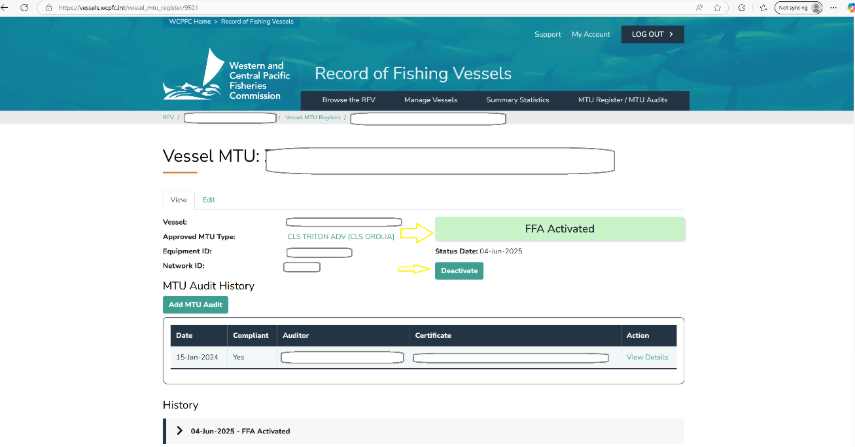
For vessels that are in FFA Good Standing, their VMS positions are from the FFA VMS to the WPCFC VMS. The FFA provide a monthly list of vessels that are in Good Standing. Vessels that are FFA Activated on the WCPFC RFV are displayed as FFA Activated.
When the vessels are no longer on the FFA Good Standing list, they must be deactivated first, then be activated for direct reporting to the WCPFC VMS.
Step 1: Refer to the helpdesk doc on MTUs. Click on  .
.
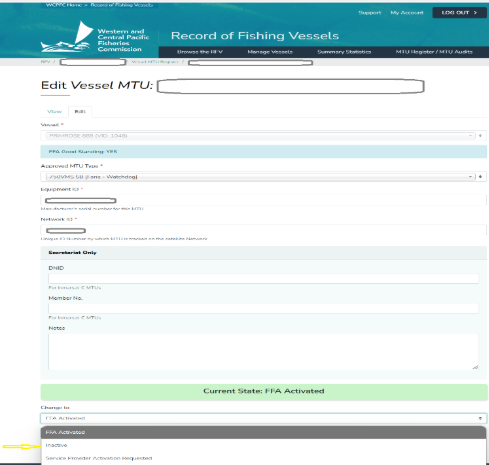
Step 2: Set the MTU Status to Inactive and click on Save.
Step 3: After deactivating the MTU then go ahead and activate a new MTU (MTU Activation) for WCPFC.