Background
The WCPFC Record of Fishing Vessels (RFV) online system allows Flag CCMs to register and update MTU/ALC details for vessels reporting directly to the Commission’s VMS. This ensures that only type-approved units and verified communication gateways are used, and that key identifiers such as Equipment ID and Network ID remain accurate and unique. Progress and outcomes for each MTU/ALC action are shown in the MTU Register and MTU Audits (e.g., Activation Requested, Active, Activation Failed, Deactivation Requested, Inactive), including alerts when any action fails. Keeping MTU records current safeguards VMS data integrity, reduces transmission gaps, and supports compliance monitoring across the Convention Area.
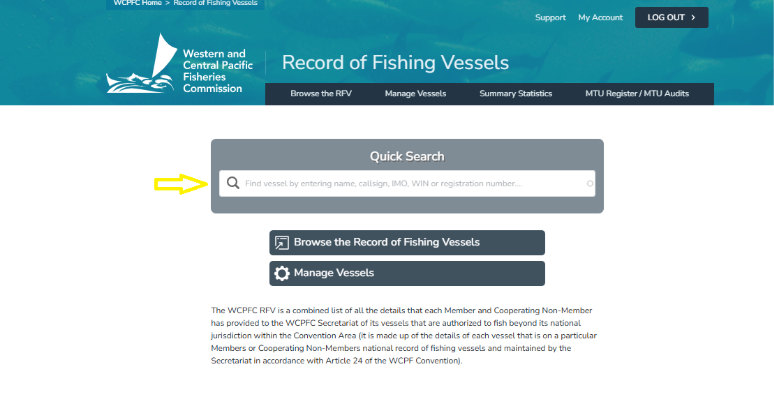
Step 1. When a CCM needs to update their MTU details they first browse for vessel on the RFV
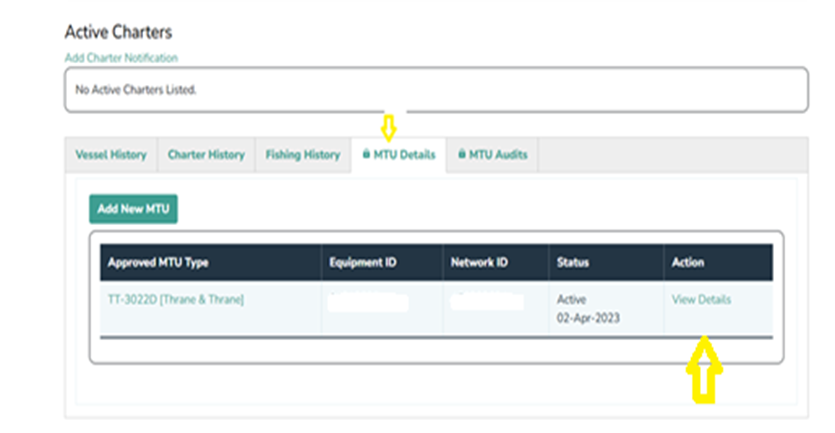
Step 2. Open the vessel record and scroll down to the MTU Details Tab and click on it. Next, under Action click on View Detail of the active MTU as shown below:
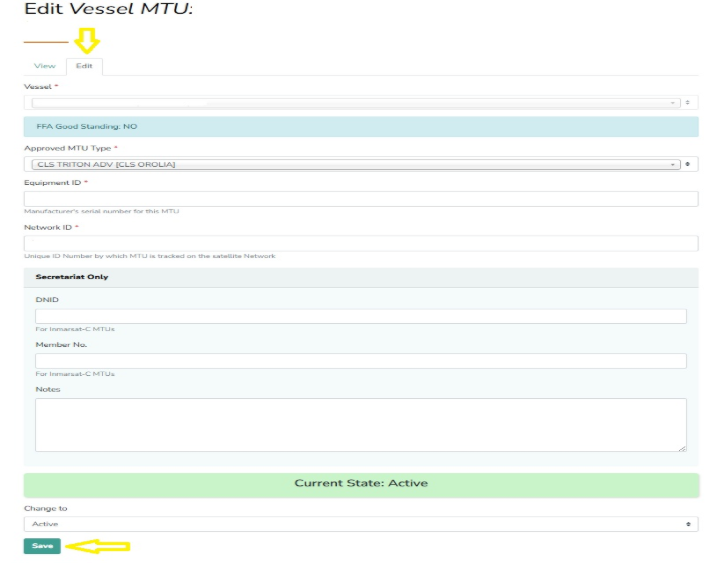
Step 3. Click on Edit and it should take you to the page as shown below. After you have updated the MTU with the necessary information, go ahead and click Save.